
Google Chrome Adds Vertical Tabs and Full-Page Reading Mode in Latest Desktop Update

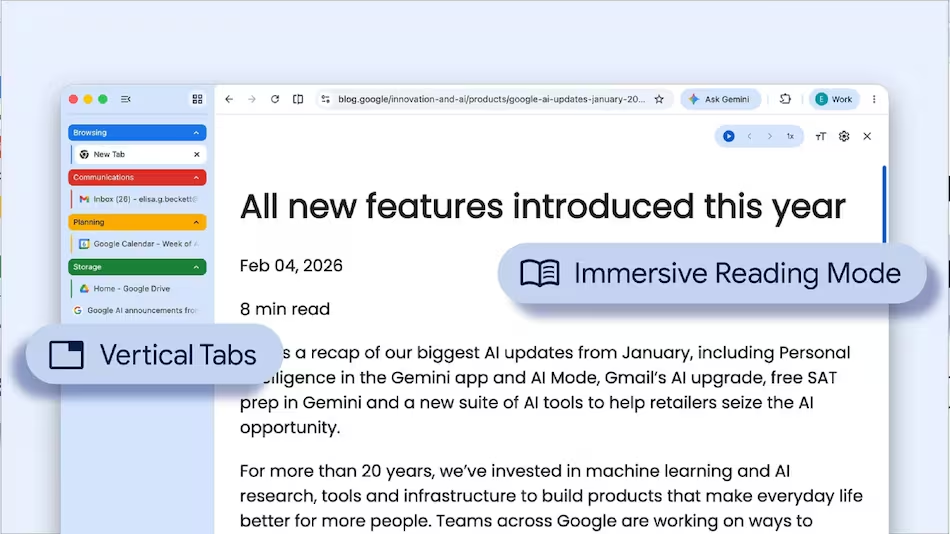
Google has begun rolling out two new desktop features for Chrome that address a persistent frustration among heavy browser users: the chaos of managing multiple open tabs and the distraction of cluttered web pages.
The update, announced on April 7, 2026, via Google’s official Keyword blog, introduces vertical tab navigation and an expanded reading mode — both aimed at making the browser a more focused workspace.
A Different Way to Navigate Tabs
For anyone who routinely works with ten or more tabs open simultaneously, Chrome’s traditional horizontal tab bar has long been a limitation. Tabs shrink, titles disappear, and finding the right page becomes a minor ordeal.
The new vertical tabs feature moves that tab bar to the left side of the browser window. Users can activate it by right-clicking anywhere on a Chrome window and selecting “Show Tabs Vertically.” With tabs stacked along the sidebar, full page titles remain visible regardless of how many are open, and existing tab groups become easier to navigate at a glance.
It is a workflow change that developers, researchers, journalists, and anyone juggling multiple sources in a single session will likely appreciate. For users in Nigeria and across Africa working on bandwidth-conscious setups — where keeping fewer but more intentional sessions open matters — cleaner tab organisation can have a small but real efficiency payoff.
Reading Mode Gets a Larger Canvas
Chrome’s reading mode has existed for some time as a way to strip away sidebars, ads, and visual noise from web pages. Google has now expanded it into a full-page experience.
Right-clicking on any page and selecting “Open in reading mode” transforms the current tab into a distraction-free, text-centred layout. According to Chrome’s support documentation, the feature is designed for longer-form reading where focus matters. The new full-page interface gives that experience considerably more room to breathe.
For students, researchers, and professionals who rely on Chrome to read reports, articles, or documentation — a common reality across African universities and workplaces — this kind of clean reading environment has practical value without requiring any third-party extensions.
Incremental, But Considered
Neither feature represents a fundamental shift in how Chrome works. Both are opt-in, require no configuration beyond a right-click, and slot into existing browser habits without disruption.
What they reflect, however, is a sustained Google effort to make Chrome more competitive on the productivity front — particularly against browsers like Microsoft Edge, which has offered vertical tabs for several years, and Arc, which has built an identity around tab management.
The rollout is gradual. Not all Chrome users on desktop will see both features immediately, though Google has not specified a timeline for full availability.
Chrome remains the dominant browser globally and across Africa, where StatCounter data consistently places its market share well above competitors. Updates that improve daily usability — even modestly — reach a substantial share of the continent’s internet users.