
Kaspersky discovers Keenadu – A multifaceted Android malware that can come preinstalled on new devices


Kaspersky has detected a new malware for Android devices that it dubbed Keenadu. This malware is distributed in multiple forms – it can be preinstalled directly into devices’ firmware, embedded within system apps, or even downloaded from official app stores such as Google Play. Currently Keenadu is used for ad fraud, with attackers using infected devices as bots to deliver link clicks on ads, but it can also be used for malicious purposes, with some variants even allowing full control of the victim’s device.
As of February 2026, Kaspersky mobile security solutions detected over 13,000 devices infected with Keenadu. The highest numbers of the attacked users have been observed in Russia, Japan, Germany, Brazil, the Netherlands, Turkiye, and other countries have been affected as well.
Integrated into device firmware
Similar to the Triada backdoor that Kaspersky detected in 2025, some versions of Keenadu are integrated into the firmware of several models of Android tablets at one of the supply chain stages. In this variant, Keenadu is a fully functional backdoor that provides the attackers with unlimited control over the victim’s device. It can infect every app installed on the device, install any apps from APK files and give them any available permissions. As a result, all information on the device, including media, messages, banking credentials, location, etc. can be compromised. The malware even monitors search queries that the user inputs into the Chrome browser in incognito mode.
When integrated into the firmware, the malware behaves differently depending on several factors. It will not activate if the language set on the device is one of Chinese dialects, and the time is set to one of Chinese time zones. It will also not launch if the device doesn’t have Google Play Store and Google Play Services installed.
Embedded within system apps
In this variant, the functionality of Keenadu is limited – it cannot infect every app on the device, but since it exists within a system app (which has elevated privileges compared to usual apps), it can still install any side apps that the attackers choose without the user knowing. What’s more, Kaspersky discovered Keenadu embedded within a system application responsible for unlocking the device with the user’s face. The attackers could potentially acquire victim’s face data. In some cases, Keenadu was embedded within the home screen app which is responsible for the home screen interface.
Embedded within apps distributed through Android app stores
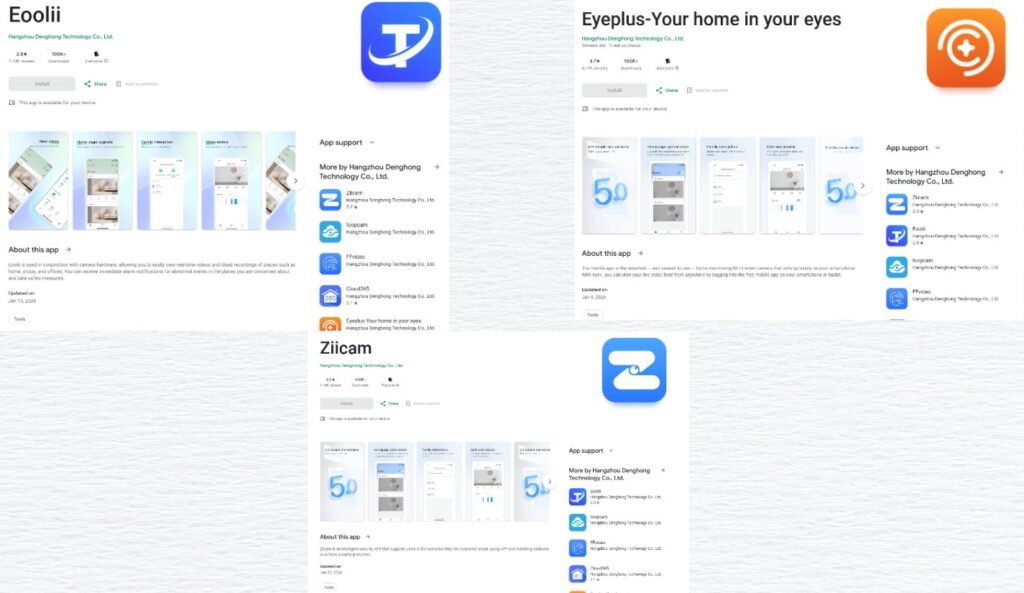
Kaspersky experts also discovered that several apps distributed on Google Play are infected with Keenadu. These are apps for smart home cameras, and they’ve been downloaded over 300,000 times. As of the time of publication, these apps have been removed from Google Play. When the apps are launched, attackers may launch invisible web browser tabs within the apps, that can be used to browse through different websites without the user knowing. Previous research from other cybersecurity researchers also showed similar infected apps being distributed via standalone APK files or through other app stores.
“As our recent research showed, preinstalled malware is a pressing issue on multiple Android devices. Without any actions on the user side, a device can be infected right out of the box. It is important for users to understand this risk and use security solutions that can detect this type of malware. Vendors likely didn’t know about the supply chain compromise that resulted in Keenadu infiltrating devices, as the malware was imitating legitimate system components. It is important to check every stage of the production process to ensure that device firmware is not infected,” comments Dmitry Kalinin, security researcher at Kaspersky.
See the post on Securelist for more information.
Recommendations:
- Use a reliable security solution to be promptly notified of similar threats on your device.
- If you are using a device with infected firmware, check for firmware updates. After the update, run a scan of the device with a security solution.
- If a system app is infected, we recommend that users stop using it and then disable it. If a launcher app is infected, we recommend disabling the default launcher and using third-party launchers.